Wednesday, June 25, 2008

Stalking Paul Newman


I mentioned in another blog that I like to go to the Grand Prix races in Edmonton. It's not because I like cars. It's because there are SO MANY great pictures there. I want to share an article I wrote a couple of years ago about "Stalking Paul Newman." It doesn't have anything to do with Photoshop...but I hope you enjoy it.
***************

STALKING PAUL NEWMAN
I am going to get THE definitive picture of Paul Newman, I decide. I am filled with what writers call “steely determination.” (I am not entirely sure what “steely determination” is – but it seems to fit. Especially the “steely” part. I am definitely feeling “steely.”)

I am going to photograph a Hollywood legend. Star of The Sting, Butch Cassidy and the Sundance Kid – the original Cool Hand Luke. Close personal friend of Liz Taylor….yup…that Paul Newman.

THIS is the year. My year.

I am armed with a liter and a half of the World’s Most Expensive Grand Prix water (three bucks a bottle!), my trusty camera and a recently acquired Pit Walk Pass.

The Pit is aptly named, I decide. It smells like someone has been cooking old fish, but that may just be the interaction of burning rubber and motor oil. The Pit crackles with a well rehearsed but nonetheless frenzied activity. But I will not be distracted. I know that Newman Haas Racing is sponsored by the Golden Arches. So I am looking for McDonald’s.

I creep along the Pit Walk, every sense tingling – my entire being fixed on the Goal, finger quivering over my shutter button, camera poised. I am a hunter. My steely eyes narrow against the glare of the sun.

THIS is the year….

“Did you see him?” my wife asks. At first the voice sounds far away. I process the words.

“See who?” I ask back. There is a sinking sensation starting somewhere deep inside.

“Paul Newman,” she says, using the patient wife voice.

“What?” There’s a whiney quality in my voice that is most unfitting to a Great Hunter.

“Paul Newman. He just drove by on a red scooter.”

“What?” (‘What’ is one of those words that never fail you. So I say it again.) “What?”

My wife sighs and looks off into the distance. I suspect she is trying to decide if it is worth repeating to me without any visual aids or a suitably large collection of Crayons.

“Paul Newman just rode by on a red scooter.”

An image of Butch Cassidy doing charming tricks on a bike to a giggling-way-too-hot Katherine Ross comes to mind. A red scooter?

“Ah. He’s here then,” I respond as my mind jerks itself back to reality. It’s one of those sentences you start and midway through; you realize no matter what you do, you are going to sound really stupid, so you try to turn it into a joke. I rakishly raise my left eyebrow significantly.

My wife knows me too well, simply heaves a tired sigh, and looks off in another direction.

“A red scooter?” I ask. You kind of expect Paul Newman to arrive in a limo, preceded by at least seven rose petal tossing flower girls and a couple of heralds playing those long trumpet thingies.

My wife nods. She is growing disinterested. I can tell this by the way her eyes glaze over and take on that far off quality as she looks in every direction but mine.

“I know where he went,” says she.

“You do?” I ask. I absolutely firmly resolve that this will be my LAST lame question of the century.

“You want to know or not?”

I nod with a weakly affected boredom. Slyly, I wish to convey the impression that I know exactly where Paul Newman is…and am simply testing her to see if she is worthy to make the trek with me.

She sighs.

Again.

I pause and cleverly snap a quick shot of the only female racer, Katherine Legge, on pre-race trip to the porta-potty. I am, after all, the Great Hunter.

My wife has disappeared. I trail after her…or more precisely…where I think she may have gone.

I locate her. She points and says: “There he is.”

“Where?” I ask.

She points to the back of a white head in a red hat sitting high in a red booth.

“There?” I ask. I am already breaking that last-lame-question-of-the-century thing.

She nods.

I place my Lowepro bag at my feet, take off the water cooler and settle into my Hunter’s Blind. I wait.

Cars drive by.

I wait.

Cars come into the pit and gaily costumed men in helmets use mysterious but very loud machines for fifteen or twenty seconds. When the cars drive off, the people in the stands applaud.

Uh huh.

I wait.

I see Paul is drinking unflavored Dasani water. I watch him drain the bottle. Okay well actually…I see the bottle tilt upward, held in a really old hand…and get drained. You can almost see Newman’s lips. I shrewdly snap off a couple of quick shots. You can never tell when someone will want a picture of Newman’s lips.

Time passes.

“Is that him?” asks a woman as she waddles up. She sounds breathless and smells unpleasantly of hot dogs.

“Yup,” I say, noting she is trying to use her bulk to shove her way into my portion of green fence.

I look significantly at her and then down at the Lowepro bag in front of me…then back at her. “This place is mine,” my look says. “See? There’s my bag and water cooler and everything.”

She ignores me and toes my bag back a few inches. She shoves herself more firmly into my area and peers around. I think she may be nearsighted.

“I don’t see him,” she sniffs.

I am torn: Do I tell her the truth and win her respect…or simply let her think I am a misguided-but-well-meaning-fellow-groupie so maybe she’ll go away?

No contest.

“Guess not,” I say, using my most sheepish expression.

She sniffs again and waddles off.

A hand grasps the edge of the booth…a white shoed foot steps out….PAUL NEWMAN is coming out of the BOOTH!

I grab my camera and set it to my eye. I wait seven years for the little red square and the reassuring “ting” sound that tells me I am focused.

Where is he going? What is he doing?

Ting!

This is it. My one chance. I watch as he takes careful old-guy steps down the stairs, preserving each step safely on my digital chip. He is moving toward……a cooler…….oh my God…he is getting WATER!

Paul Newman is getting his OWN WATER.

My camera is clicking clicking…the battery warning light comes on. I mutter under my breath, decide prayer is better, and keep shooting.

As Paul leans forward and takes out TWO fresh waters, the battery warning light turns red. But I am shooting….shot after shot…praying for focus…thinking “This is Cool Hand Luke!”

I consider calling out to him. No one else seems to notice. But if I call out to him, what do I say? I stay quiet and continue shooting. Paul gets his water and goes back to the booth.

Minutes after he returns to the booth a young woman settles herself in beside him and he obligingly slides over a few inches to make room. Just like a regular guy.

I need to rest for a second.

My wife comes over.

“Did you see that?” she asks.

“Uh huh,” I say. It’s about all I can manage.

“How come you were standing way over there?” she asks.

“What?” I respond. (You can’t ever get enough of the old standby.)

“He was right here,” she says, gesturing to the water cooler, a scant five feet away from her…I have cleverly used a telephoto lens. The sinking sensation gets deeper. My telephoto lens and I have had frequent disagreements about what the term “focus” really means.

I mutter something meant to reassure us both…mostly me…and take up my spot at the fence again, on the lookout for waddling breathless women.

Cars go round and round the track.

I take carefully rationed sips of water, telling myself it is just plain strange to try calculating how much each sip is costing me. My eyes are fixed on the back of a white haired head with a red ball cap. I am willing him to come out, mentally reminding him that he has had THREE bottles of water and he really should step out. I have already scouted the Pit Walk and know precisely where the nearest Porta Potty is.

I wait. I consider staking out his red scooter. After all, he HAS to go to the scooter sometime, right? Thus far, I have nobly resisted the urge to photograph Paul Newman’s red scooter because the idea is just too stalker-like.

(You just shush.)

So I wait…more cars snarl by.

People ooooh and ahhhh….and I wait some more.

I begin to realize that I have had a lot of water myself. A LOT of water. My body is pretty much done with it now…but I remind myself about the mission…I think of bright meadows without any streams in sight -- just a gaggle of galloping magazine and newspaper editors waving blank cheques at me.

Cars drive by.

I watch Paul Newman step out of the booth.

Did you get that?I watch him, dully thinking “Oh…that’s Paul Newman…getting out of a booth…about fifteen feet away from me.

“How nice.”

Some deep part of my subconscious drives an elbow into my ribs…the psychic equivalent of “HEY! THAT’S PAUL NEWMAN!”

“What?” I say to my subconscious.

“CAMERA…GET THE CAMERA!!!”

Adrenaline surges through me. I am the hunter who had the Yeti in his sights and dozed off. I am the midnight photographer who watches Nessie rise out of a foggy loch and thought “Oh…how nice” to himself.

There will be time for self loathing later, I decide. Plenty of it.

I have reloaded my camera with batteries. Swallowing hard, I raise my camera to my eye and start shooting. Newman crosses to chat with one of his drivers…a guy who had some car trouble. They are talking…just a couple of guys. I am waiting for Newman to have an expression….anything….and as the camera goes click click I wonder what people call him. Paul? Mr. Newman? Luke? Butch?

I only need one picture, I think. Just one.

I stalk him as he walks across the tarmac…just a few feet away, pretending to ignore me. Click click….and I see him pause as he hears a voice familiar to my ears. He is just starting up his red scooter (which I now feel free to photograph, by the way, since it is no longer a plain red scooter but is, in fact a red scooter with Paul Freaking Newman on it)…the voice is very familiar.

IT’S MY WIFE TALKING TO PAUL NEWMAN!

Okay…I have been busily sneaking shots and there she is talking to him. Actually talking. My wife isn’t afraid of anything. I begin formulating a defense in case the Hollywood Royalty Police to come and take her away.

Surely directly talking to Paul Newman is against some law…

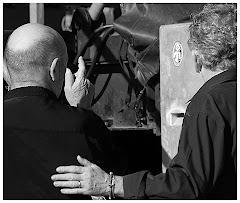
I watch as she takes off her hat and holds it out to him. She wants him to sign her hat. Newman is considering it. You can see the debate going on in his eyes. He pauses. My wife is looking at him.

He looks beyond her and sees a gaggle and a half of people hurrying his way. He half says/half mutters “I can’t…if I do….I’ll never get out of here…” Then he stops, kisses the tips of his fingers and blows the kiss at my wife. He's still a charmer, I decide.

He’s also polite and I think I really should get a photo of my wife talking to Paul Newman as he drives off on his little red scooter. Realizing I am to photojournalistic reflex what a sloth is to a champ car, I watch him drive off – and try not to meet my wife’s eyes.

I know after all – which the question is coming: “Did you get that? Did you get me talking to Paul Newman?”

I realize later that I have a picture of Paul Newman talking TO my wife. But my wife isn’t in the picture, though if you squinch up your eyes really tight you can sort of see her reflected in his sunglasses.

Helplessly, I watch Paul Newman putt putt off into the sunset, riding tall on a little red scooter. He wears sunglasses, but I know clear blue eyes are fixed in front of him.

I half wish he would turn in the saddle and wave goodbye…or change his mind and come back to sign my wife’s hat after all. But he doesn’t. And you know something? I don’t want him to.

If he did, he wouldn’t be Cool Hand Luke, which is exactly who I want him to be.

Wednesday, June 11, 2008

Adjustment Layers...and Why You Should Care

I think this is one of the top questions: "What's an adjustment layer?" There's a second unspoken question: "Why should I care???"

Adjustment Layer is third ONLY to "Curves", the whole notion of "Layers" and my most used command ("Undo") in the pantheon of "Cool Stuff in Photoshop."

What is it?

It's a layer that you can do all kinds of adjustments (from Brightness/Contrast to Curves to Hue and Saturation) to an instantly created COPY of your original. This means that if you screw it up, you aren't totally messed up because the work you did is on a copy. I think of the Adjustment Layer as an infinately adaptable magic layer on top of my graphic...but that's probably just me.

How is this different from the idea of copying a layer and working on the copy? you ask. Gee...that's a good question. Adjustment layers are wonderful because you can SELECT areas to apply your changes to without ever touching a selection tool.
You PAINT them onto the Adjustment mask.

Once you've added an Adjustment Layer you'll see a NEW box opening in Layers. This is a relatively terrifying thing the first time you look at it because it looks so darn strange.
I've outlined the actual Adjustment Layer in spiffy red so you can find it. You get a different Adjustment menu (this one is a Curves Adjustment) depending on which adjustment layer application you chose.
The way-seriously-cool-thing about Adjustment Layers is that you can now feel free to totally screw up your graphic. You can try wild application and strange combinations and it doesn't matter. If you don't like the way it looks you can delete the layer and start all over.
I know what you're thinking. "How do you make changes to the picture without making a selection." Yet another good question!
You will see that the Adjustment layer is represented as WHITE. Finish up your adjustments. (Let's say that you want to vastly lighten a portion of your picutre...but not all of it. With your Adjustment Layer you can lighten the WHOLE picture until it looks really hideous -- all except the areas that you wanted to lighten.)
Take your Paint Bucket Tool and choose a BLACK from the color picker. Pour the Paint Bucket over top of your Adjustment Layer. You will see all your recent changes disappear. Why? Because BLACK COVERS THE LAYER.

Take your brush and choose the White default color from the color picker. Now brush over ONLY the areas of your photo you want to change.
Leave some time so you can make the appropriate number of "ooooo" and "ahhhh" sounds as you watch ONLY the portions you wanted to change show up on your screen.

You can make very precise changes to your graphic. No muss. No fuss. No selections.
It is true that what I've told you about here is a serious over-simpification of how to use Adjustment Layers. But remember that people write books about this stuff. My advice? Play around with all the many Adjustment Layers available. You'll see your graphics doing the most interesting things.
And if you mess something up? Relax. It's Photoshop.

Thursday, May 29, 2008

Photographing Kids


Kids are great to photograph, right?
They are unpretentious, they are sincere and -- if you can get the right kid -- they are wonderful subjects.
On the flipside, you need to forge a personal bond with them, some kind of relationship, that allows them to be comfortable in front of a camera and natural in all they do. It's that "naturalness" you are trying to capture in that split second the camera gives you to take the shot.
If you planned to take a picture of an adult, you would take the time to invest yourself in getting to know them, right? It's no different for kids. You need to take time to kibbitz with them, to get to know them and then the great gates of images open.
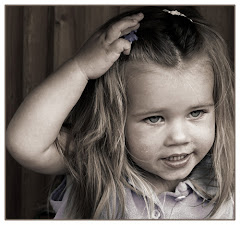
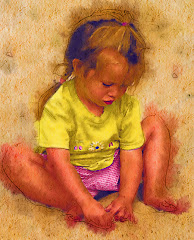
I spent close to half an hour with the child in this picture. She happens to be my granddaugher, but the fact that I was sitting on my porch, taking picture after picture may have served to make the whole picture taking process more difficult. The photographer, whether they are photographing children or adults, needs to realize that the camera itself is a barrier to interacting with the subject. It's a great black block of matter that shows them to the world. While it's true that kids are less likely to flinch in the face of the lens, it's also true that, as an artist, you are looking for a way to present that youthful presence to an audience.
In this particular picture, she was walking away and then turned to say something to me over her shoulder. I captured the image here and so the image is held here in that second.
Take time to understand the subject of your portrait. Try to capture them in that fraction of a second where they show you who they are. Respect them as complete people.
For this picture, I copied my layer and then converted the picture to black and white. Then I worked on the Opacity, reducing the blend between the two to 50%. This adds a nice "hand tinted" look to the photo -- predominantly on the dress and hair highlights.
The picture was then flattened and framed and we're done.

Tuesday, May 20, 2008

Photography, Photoshop and PowerPoint

They are the big three: Photoshop, Photography and PowerPoint. Think about it for a second: you shoot raw with your camera, you make it into art with Photoshop and then you display image after image with PowerPoint.

Feeling a little wild? Add music. You can go completely nuts and even insert transitions and custom animation to create the kind of travel album "slide show" that won't leave your guests clawing at the door trying to escape.
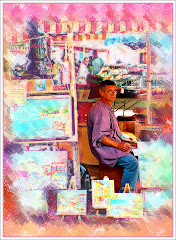
I've posted a lot of articles here about how to get the travel shots you want -- which pretty much deals with the "Photography" aspect. It goes without saying that you need to take good pictures to give yourself the "material" you need. To summarize the high points about travel photography:
1) You need to examine your camera bag, ensure you have charged batteries and back up batteries, memory cards, different lenses and gear that will enable you to shoot despite the weather.

2) You need to be absolutely "present" as you travel. Always look for the picture that tells a story or conveys a sentiment or emotion.

3) You need to be organized.

Photoshop treatments have also been covered extensively here. There are a ton of ways you can improve a picture. The one quick point I will make here is that you should reduce the resolution to 72 (Image> Image Size> Resolution) if you're prepping photos for a PowerPoint presentation.

You will be displaying them in a monitor or through a projector. Bigger resolution isn't necessary and will make the images harder for PowerPoint to handle. You run the risk of jerky looking movements of images of you load them down with too much unnecessary visual data.

PowerPoint is the thing many photographers don't know much about. And this is a great pity, because it's a program ideally suited to displaying your work to the heartfelt "oooohs" and "ahhhhs" of your adoring audience.

It's easy to use and most people have one version or another on their computers.

To INSERT an image onto a PowerPoint slide, go to Insert> Picture. At this point you decide where your pic is coming from...most likely it's your "File" -- which means you plan to take it off of your computer.

By default, PowerPoint will insert the picture in the precise center of the screen.

Add New Slides (Insert> New Slide) for each new slide. (If you've created a background as I did in the example above, you may do well to COPY the slide and insert a new picture on the existing background.)

You may also want to consider bringing in each new picture with an animation. (Slide Show> Custom Animation) I have yet to find a better method for introducing pictures than "Fade." It's elegant, doesn't get in the way of your graphic and adds a touch of class to your presentation.

To make the slide show run on it's own, you will need to use a nifty little tool called "Rehearse Timings." (Slide Show> Rehearse Timings) As you advance through the pictures by pressing the space bar, your Rehearse Timings will remember the way you did it. If, at the end, you are happy with the slide show simply accept the option that allows you to "Save" your settings.

Unless it's a really complex image, I will leave each image on-screen for seven or eight seconds. A timer appears in the upper left hand corner of the screen which gives you both the time for each slide AND the time for the overall presentation.

Finally, you may want to "Save As" a "PowerPoint Show." This means the instant you click on the nifty little icon, the PowerPoint starts and runs itself -- leaving you free to talk about the pictures your adoring audience is enjoying.

There's a NEW PHOTOSHOP COMMUNITY

I haven't been around the blog much because I have been busy setting up a new community on Facebook. Web Jedi, Mark and I are pretty excited about it. We've invited our membership from Photoshop Basics and a lot of other people to join in and see what happens.

We've announced our first contest...and there's even a prize.

This isn't something we're making money from. It's a free community designed for all sorts of Photoshop users from advanced to beginners. We really want to create a community that allows people to share ideas and concepts, pictures and feedback.

We're nearly 30 members right now and the exciting thing is that they are from all over the world so we get a great cross section of people. Check it out at this link. Remember it's free. http://www.facebook.com/group.php?gid=2332124074


Feel free to pop by and have a look.

Thursday, May 15, 2008

Take another look at Black and White


There is a powerful thing that is created when a graphic goes from color to Black and White. You see details more clearly in a B&W than you do on a color graphic.


See that cute kid? I am blessed with children in my life who know how to pose. I asked her not to smile. She didn't and this is what happened.
Which picture is stronger?
I don't see a contest here. Despite the fact that the subject matter (the aforementioned cute kid) is visually interesting, the job of the graphic artist is to make the visual "more gooder."

One of the great things about Photoshop CS3 is the control we are given over the whole desaturation process. You will find this little gem under Image> Adjustments> Black and White. This will bring up a spiffy new menu that hasn't existed before.
To really understand the power of this menu, you need to do one of two things. First: open a picture that is LOADED with color. Play around with the sliders and watch the voodoo-magic-way-cool stuff that happens to your graphic as you do. The settings I used on the original are represented on Black and White graphic. But you will find that there are WAY too many options represented here for a wee blog.
The second option is, of course, to pick up our "Perfect Portraits" course from our website. It's due for release in the late summer/early fall.
Meanwhile -- take a hard look at the many many options you have at your fingertips with this wonderful little adjustment, which I happen to think is the second greatest thing about CS3. I'll tell you what the Absolute Coolest Thing is on a later blog.
Just three things you may want to keep in mind BEFORE using the B &W Adjustment menu:
1) Always ALWAYS work on a layer copy. This way if you mess it up the world, as you know it, won't end.
2) Do your other adjustments (sharpening etc.) before you start working in B&W.
3) You will often find that INCREASING THE CONTRAST before taking the whole thing to black and white can greatly enhance the finished product. Remember that the great luxury Photoshop offers is the ability to work in layers.
Finally -- you may want to consider simply desaturating PART of your graphic. I have one displayed on my NAPP site (the link's at http://www.photoshopbasics.com/ ) that is only an orange umbrella on an otherwise black and white graphic. Very easy to do -- and it can be remarkably effective.

Tuesday, May 13, 2008

Internet Woes...and Whoas!

"They came from all over the continent and beyond. They came with dreams and greed and determination and nearly all of them failed. But for the few, the very chosen few, who had the exact right combination of luck, determination and fortitude, there were riches."

The quote is from a book called "Golden Dreams" by a relatively obscure author with the highly improbable name of Joseph Wrongway. (I suspect Joe has heard every possible joke about his name, so we'll let it go.) He was writing about the gold fields and the prospectors they drew. The perverse thing is that two miners could be literally side by side: one would hit a rich vein and the other would find nothing. (The pic to the right was taken in Alaska, which, frankly is as close as I have ever come to actual gold fields.)

This makes me think of the Internet. If our century has a gold field, this is it. And it's fitting, in some perverse way, that this field doesn't really exist anywhere. You can't GO to the Internet, although you can see it on your monitor. No one really knows exactly what it is because it isn't really just one thing. It's a conduit, I suppose.

It will carry my thoughts as I sit here in my office typing, to you. And it doesn't matter if you are next door or in India. We can still exchange ideas.

Your choice is what voice you choose to listen to...what communities you might want to belong to...what internet stores you choose to support with your hard earned dollars. It's all the Internet. Instant communication...instant information. Anywhere.

I am old enough that I am really impressed with stuff like that.

The Internet is also like the klondike gold fields because there are a few people who will crack the secret code and get rich. I understand the guys who own Google made two billion dollars in one hour when the stock jumped. Those kinds of earnings dwarf even what the richest gold strike of all time earned. And they did it in an hour.

All of the massive companies: Microsoft, Adobe, Yahoo, Dell and so many more make piles of money or send out cost effective precisely targetted email advertising through the Internet.

Amazing.

I started working on Photoshop Basics in 2004 as I remembered how much I struggled in the beginning to learn the simple basics of this great but seriously intimidating program.

I was frustrated. I had expended hundreds of dollars and hundreds of hours trying to figure out Photoshop. The whole thing made me nuts. There just didn't seem to be anywhere that just offered me a SIMPLE and STRAIGHTFORWARD package of information IN ONE PLACE that would show me the basics.

That's why I wrote the first course "Learn the Basics of Photoshop in SIX HOURS." My feeling was that there were some basic things that you HAD to know in order to start using the program properly. So I thought about it for a long time and then wrote them down.

That little course has done pretty well for itself...and that led to more and more courses.

Each one takes somewhere between five hundred to a thousand hours to write. It's not like a novel. You'd be surprised to learn how difficult it is to explain the steps even for something simple like create a new layer.

We've gotten some great feedback on our courses from more advanced users as well.

I don't have any illusions about getting rich doing this. I expect that people will enjoy the courses, maybe share their work. My ultimate plan is to create a community for Photoshop users, new and old, to share ideas and information. To paraphrase myself in the 70's, that whole notion strikes me as "way cool."

At the nexus of everything is involvement. Web Jedi (Mark) and I have put in countless hours trying to make it easy for you to get involved.

We have made sample lessons available for free.

We've just released a great "mini course" that goes into the nuts and bolts of stuff like creating Fantasy Art, totally off the wall text treatments and one of the most interesting portrait treatments you'll see.

It's a course called "Setting Your Brain Free" -- and it's available on our site (http://www.photoshopbasics.com/ ) for $9.95.

Is this an ad?

Sort of. But more than the ten bucks, we'd like to KNOW people are interested in what we're doing and are prepared to give it a try.

We really want to create a community where people can come and talk and share.

But I often have the feeling I am standing on my little six foot square claim on the Internet gold field trying to attract attention while there are six million other people trying to do the same thing.

Mark (website jedi) and I are starting to feel the strain. We don't much want to roll the potentially expensive dice with Google Adwords or the myriad of internet publicity options out there.

If you'd like to be a part of this, you need to let us know. We have email. We have products. We have a website and we'd love to hear from you.

Think about it.